



Introduction
Running a restaurant involves much more than taking orders and processing payments. Restaurants need to manage tables, menus, inventory, employees, suppliers, sales, deliveries, customer information, and daily operations across one or multiple branches.
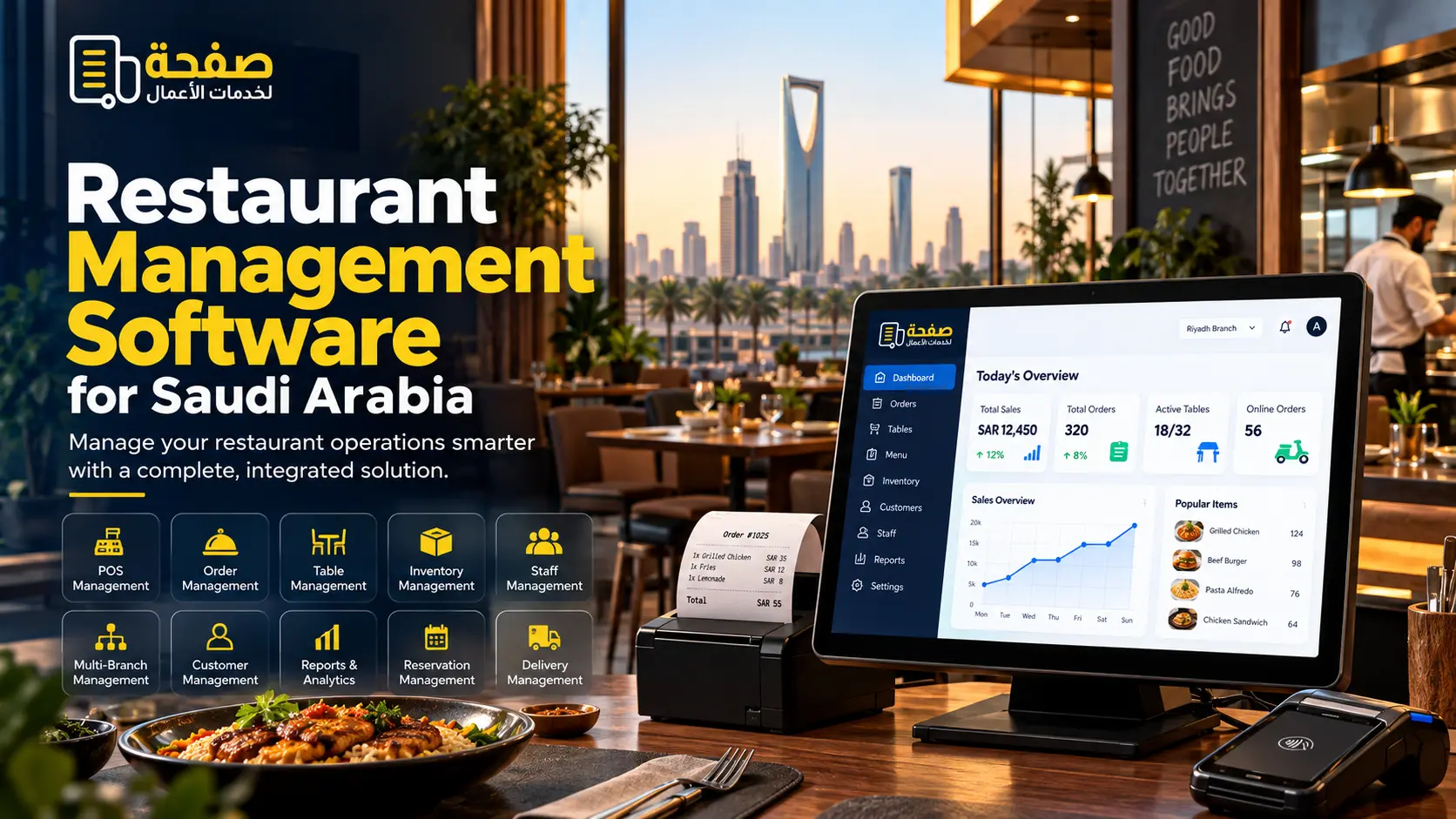
A modern restaurant management software solution brings these operations together in one centralized system. A properly designed restaurant management system can help restaurant owners and managers monitor daily activities, organize workflows, improve operational visibility, and manage multiple locations more efficiently.
For restaurants in Saudi Arabia, including Riyadh, Jeddah, Dammam, Al Khobar, and the Eastern Province, the right system can be designed around the restaurant’s operating model, branch structure, Arabic and English requirements, point-of-sale operations, inventory, staff management, and reporting needs.
Safha Technologies develops customized digital solutions, including restaurant management software development, POS solutions, business automation, custom software, mobile applications, websites, and UI/UX design.
Key Takeaways
- Restaurant management software centralizes important restaurant operations.
- A restaurant management system can include POS, inventory, tables, orders, staff, reporting, and branch management.
- Restaurant inventory management software helps businesses monitor stock, ingredients, purchases, and consumption.
- Restaurant table management software can organize table availability, reservations, and seating workflows.
- A centralized system can be especially useful for restaurants operating multiple branches.
- Saudi restaurants may require Arabic and English interfaces, localized workflows, integrations, and flexible reporting.
- The right solution should be selected according to the restaurant’s size, operating model, number of branches, and future growth plans.
What Is Restaurant Management Software?
Restaurant management software is a digital system designed to help restaurants manage their daily business operations from one platform.
Instead of using separate systems for sales, inventory, employees, tables, orders, and reporting, a restaurant can connect these activities through a centralized management system.
Depending on the project, a restaurant management system can include:
- Point-of-sale management
- Order management
- Menu management
- Table management
- Reservation management
- Inventory management
- Ingredient tracking
- Purchase management
- Employee management
- Customer management
- Branch management
- Sales reports
- Financial reports
- Delivery management
- Notifications
- Business dashboards
The exact features depend on the restaurant’s operational requirements.
Restaurant Management System POS: What Should It Include?
The point-of-sale system is one of the most important components of a restaurant management system.
A restaurant POS can help staff manage orders and payments while connecting sales information with other areas of the business.
Depending on requirements, a restaurant POS may include:
Order Processing
Staff can create orders, modify items, add notes, apply discounts where authorized, and process different order types.
Dine-In Orders
Orders can be associated with specific tables and areas within the restaurant.
Takeaway Orders
The system can separate takeaway orders from dine-in transactions.
Delivery Orders
Restaurants can manage delivery orders and connect them with their delivery workflow or external platforms where supported.
Payment Management
The system can support the payment methods required by the restaurant and generate transaction records.
Menu Management
Managers can update menu items, categories, prices, availability, and other product information.
Sales Reporting
Restaurant owners can monitor sales information through reports and dashboards.
Restaurant Inventory Management Software
Inventory is one of the areas where restaurant operations can become complicated, especially when a business manages many ingredients, menu items, suppliers, or branches.
Restaurant inventory management software can help businesses organize:
- Ingredients
- Raw materials
- Finished products
- Suppliers
- Purchase orders
- Stock quantities
- Stock movements
- Wastage
- Consumption
- Reordering
- Branch inventory
For restaurants that prepare food from multiple ingredients, the system can also be designed around recipes and ingredient consumption.
For example, when a menu item is sold, the system can be configured to reflect the associated ingredient consumption based on the restaurant’s defined recipes.
This can give managers better visibility into stock levels and purchasing requirements.
Restaurant Table Management Software
Managing tables manually can become difficult during busy periods.
Restaurant table management software can provide a visual representation of the restaurant’s seating arrangement and help staff manage table status.
Depending on the restaurant’s requirements, it can support:
- Table layouts
- Available tables
- Occupied tables
- Reserved tables
- Table transfers
- Merging tables
- Splitting bills
- Reservation information
- Dining areas
- Order association
A well-designed table management system can make it easier for staff to understand the current status of the dining area.
Restaurant Order Management Software
Restaurants may receive orders through several channels, including dine-in, takeaway, delivery, websites, mobile applications, and external ordering platforms.
Restaurant order management software can help centralize these orders and organize them according to the restaurant’s workflow.
A customized system may include:
- Order creation
- Order tracking
- Order status
- Kitchen communication
- Delivery coordination
- Customer information
- Order history
- Cancellation management
- Payment status
- Branch assignment
Connecting order management with POS and inventory can also help create a more unified restaurant operation.
Restaurant Workforce Management Software
Employees are an important part of restaurant operations.
Restaurant workforce management software can help managers organize employee-related information and operational responsibilities.
Depending on the system, features may include:
- Employee profiles
- Roles and permissions
- Shift planning
- Attendance
- Work schedules
- Branch assignments
- Performance information
- Access control
A role-based permission system can also help ensure that employees only access the functions relevant to their responsibilities.
Restaurant Franchise Management Software
Managing one restaurant is different from managing several branches.
For restaurant groups and franchises, a centralized restaurant franchise management software solution can provide a unified view of operations.
A multi-branch system can help manage:
- Multiple locations
- Branch-specific menus
- Centralized products
- Inventory
- Employees
- Sales
- Purchasing
- Customer information
- Branch performance
- Central reporting
This can be particularly useful for growing restaurant groups that need consistent processes while still allowing individual branches to manage their daily operations.
Restaurant Event Management Software
Restaurants that host private events, corporate gatherings, celebrations, or special dining experiences may also benefit from dedicated event management functionality.
A restaurant event management system can help organize:
- Event bookings
- Customer details
- Event dates
- Guest numbers
- Menus
- Packages
- Payments
- Event status
- Staff requirements
- Special requests
This can bring event-related activities into the same operational environment as the restaurant’s regular business.
Benefits of a Restaurant Management System
A restaurant management system can support different areas of the business.
Centralized Operations
Sales, inventory, orders, employees, tables, and reports can be managed through connected systems.
Better Operational Visibility
Managers can access organized information about sales, stock, orders, and other restaurant activities.
Reduced Manual Work
Automated workflows can reduce repetitive data entry and administrative tasks.
Improved Inventory Control
Businesses can monitor stock levels, purchasing, consumption, and wastage more systematically.
Multi-Branch Management
Restaurant groups can manage several branches through a centralized platform.
Better Customer Management
Customer profiles and order histories can help businesses organize customer-related information.
Data-Driven Reporting
Dashboards and reports can provide management with information needed to monitor business operations.
Restaurant Management System Design
Good restaurant management system design is not only about how the software looks. It is also about how easily employees can use it during real restaurant operations.
The interface should be designed around the people who use the system, including:
- Cashiers
- Waiters
- Restaurant managers
- Kitchen staff
- Branch managers
- Inventory managers
- Business owners
Important design considerations include:
Simple Navigation
Staff should be able to find frequently used functions quickly.
Clear Order Interface
Creating and updating orders should require as few unnecessary steps as possible.
Visual Table Layout
Restaurants with dine-in operations can benefit from a clear representation of table availability.
Role-Based Access
Different employees can be given access according to their responsibilities.
Mobile-Friendly Management
Managers may need to review information from tablets or mobile devices.
How Does a Restaurant Management System Work?
A typical restaurant management system can connect several operational areas.
Step 1: Customer Places an Order
The order is created through the restaurant’s selected ordering channel.
Step 2: Order Is Sent to the Relevant Area
The system can communicate the order to the kitchen or relevant operational team.
Step 3: Sale Is Recorded
The transaction is recorded through the point-of-sale system.
Step 4: Inventory Is Updated
Where configured, the system can reflect the relevant product or ingredient consumption.
Step 5: Payment Is Processed
The transaction is completed through the restaurant’s supported payment methods.
Step 6: Data Appears in Reports
Sales and operational information becomes available for management reporting.
This connected workflow reduces the need to maintain the same information manually across different systems.
Restaurant Management Software for Saudi Arabia
Saudi restaurants operate across different formats, from independent cafés and restaurants to large restaurant groups and multi-branch businesses.
A restaurant management system in Saudi Arabia can be designed around the operational requirements of businesses in Riyadh, Jeddah, Dammam, Al Khobar, and the Eastern Province.
Depending on the project, Saudi restaurant businesses may require:
- Arabic and English interfaces
- Point-of-sale integration
- Inventory management
- Branch management
- Employee management
- Local payment integrations
- Delivery workflows
- Customer management
- Business reporting
- Role-based access
- Cloud-based access
- Integration with other business systems
The exact technical and operational requirements should be determined based on the restaurant’s business model and existing technology environment.
How to Choose the Right Restaurant Management Software?
There is no single restaurant management system that fits every business.
Before selecting a solution, restaurant owners should consider the following:
Restaurant Size
A small café may need a simpler system than a restaurant group with multiple branches.
Number of Branches
Multi-branch businesses may require centralized reporting, branch-level controls, and consolidated management.
Required Features
Identify whether the business needs POS, inventory, tables, reservations, employees, delivery, purchasing, events, or other functions.
Integrations
Check whether the software can integrate with the systems and platforms already used by the restaurant.
Ease of Use
Employees should be able to learn and operate the system without unnecessary complexity.
Scalability
Consider whether the system can support additional branches, users, products, and transactions as the business grows.
Support and Maintenance
Understand how updates, technical support, troubleshooting, and future development will be handled.
Restaurant Management Software Development
Businesses with specialized workflows may require restaurant management software development rather than an off-the-shelf solution.
Custom development can be useful when a restaurant needs:
- Unique workflows
- Custom dashboards
- Specialized reports
- Multi-branch management
- Custom inventory logic
- Specific integrations
- Arabic and English interfaces
- Custom employee permissions
- Delivery integrations
- Customer applications
- Franchise management
- Business-specific automation
Custom software should be developed around actual business requirements rather than adding features simply because they are available.
Hotel and Restaurant Management Software
Businesses operating both accommodation and food services may require connected systems.
Hotel and restaurant management software can potentially connect restaurant operations with broader hospitality workflows, depending on the scope of the project.
Possible functions include:
- Restaurant POS
- Table management
- Room-related charges
- Guest information
- Inventory
- Purchasing
- Staff management
- Reporting
- Event management
The exact integration depends on the hotel’s existing systems and operational requirements.
Safha Technologies’ Approach to Restaurant Management Software
Safha Technologies develops customized digital solutions based on the requirements of each business.
For restaurant businesses, the solution can combine relevant services such as:
- Restaurant POS development
- Restaurant management software
- Inventory management
- Customer management
- Custom software development
- Website development
- Mobile application development
- UI/UX design
- Business automation
- Odoo ERP solutions
- CRM solutions
- Reporting and dashboards
The development process begins by understanding the restaurant’s workflow, users, branches, systems, and operational challenges.
The goal is to develop a practical solution that supports the restaurant’s actual operations and can be expanded as the business grows.
Conclusion
A modern restaurant management system can connect important restaurant operations, including sales, POS, inventory, tables, orders, employees, customers, reporting, and branch management.
For businesses looking for restaurant management software in Saudi Arabia, the right solution should be selected according to the restaurant’s size, number of branches, workflows, integrations, staff requirements, and future growth plans.
For restaurants in Riyadh, Jeddah, Dammam, Al Khobar, and the Eastern Province, a customized solution can be designed around the specific operational requirements of the business.
Safha Technologies helps businesses explore and develop customized digital solutions, from restaurant management systems and POS platforms to mobile applications, websites, automation, CRM, and enterprise software.
Build a Restaurant Management System for Your Business
Looking for restaurant management software development or a customized restaurant management system in Saudi Arabia?
Discuss your requirements with Safha Technologies and explore a solution designed around your restaurant’s operations.